Use camera-based AR projection for drawing practice
Built for people who want a simple path from idea to real drawing practice on iPhone or iPad.
AR drawing app
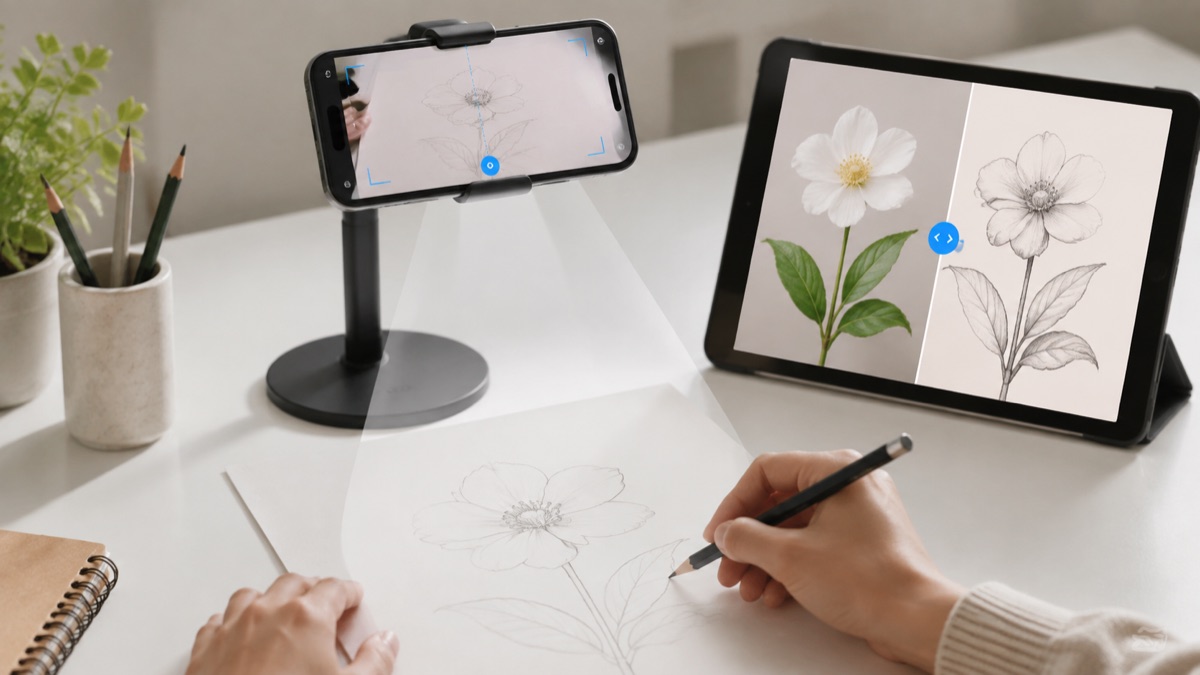
How to Draw turns your phone camera into a practical AR drawing guide, so beginners can line up a reference, trace the main outline, and build confidence on real paper.
Real drawing videos
See short @howtodrawapp demos before you install: AR tracing, drawing projector setup, photo-to-sketch practice, anime sketches, and real paper drawing workflows.
Built for people who want a simple path from idea to real drawing practice on iPhone or iPad.
Built for people who want a simple path from idea to real drawing practice on iPhone or iPad.
Built for people who want a simple path from idea to real drawing practice on iPhone or iPad.
Drawing workflow
People looking for an AR drawing app usually want a practical phone-based tool they can use with paper today, not a long tutorial before they begin.
Beginners who want to copy a reference without losing proportions.
Anime and character artists who need help placing the first outline.
Tattoo idea sketchers who want clean stencil-like shapes before refining by hand.
Parents, students, and hobby artists who want a cheaper setup than physical drawing hardware.
Useful but expensive, less portable, and slower to set up for casual practice.
Simple, but it does not help with photos, scaling, or digital sketch references.
Uses the phone you already have to move from photo or sketch reference into a paper drawing workflow.
iPhone users who want to draw on paper
Beginners who need help with proportions
Creators testing anime, tattoo, portrait, or animal outlines
People looking for a desktop-only drawing program
Users who want a physical projector instead of a phone workflow
Use a simple stand or stable stack to hold the phone.
Start with large shapes before small details.
Keep the paper fixed so the guide stays aligned.
AR drawing is for people who want practical help placing a reference on paper. The workflow is simple: align, trace the structure, then finish by hand.
Place the phone on a simple stand above the paper, choose a clean reference, lower the visual complexity, trace the main shapes first, then repeat the drawing without the guide.
The workflow focuses on one drawing goal and keeps the App Store action clear on desktop and mobile.
Open the app, pick one reference, trace the structure, then repeat the same subject without tracing. That creates learning, not just copying.
Yes. The app uses your phone camera view to help you align references and draw on paper.
Yes. It is designed for people who want step-by-step drawing help and a simpler way to start.
Yes. Anime is one of the strongest subtopics for AR tracing and step-by-step practice.
Yes. Photo-to-sketch tools help create simpler references before tracing.
Use the App Store button to open the official iPhone and iPad download.
Start with the guide that matches this search, then try the kids drawing article for simple ideas parents and young beginners can use today.